Half-hour demo, no strings attached

Everything your organisation knows, in one answer

The Knowledge Assistant reads your organisation's documents and answers the questions your team or your customers ask. Every answer carries its source, so anyone can check where it came from.

No sales track: half an hour tells you exactly what it does for your organisation.

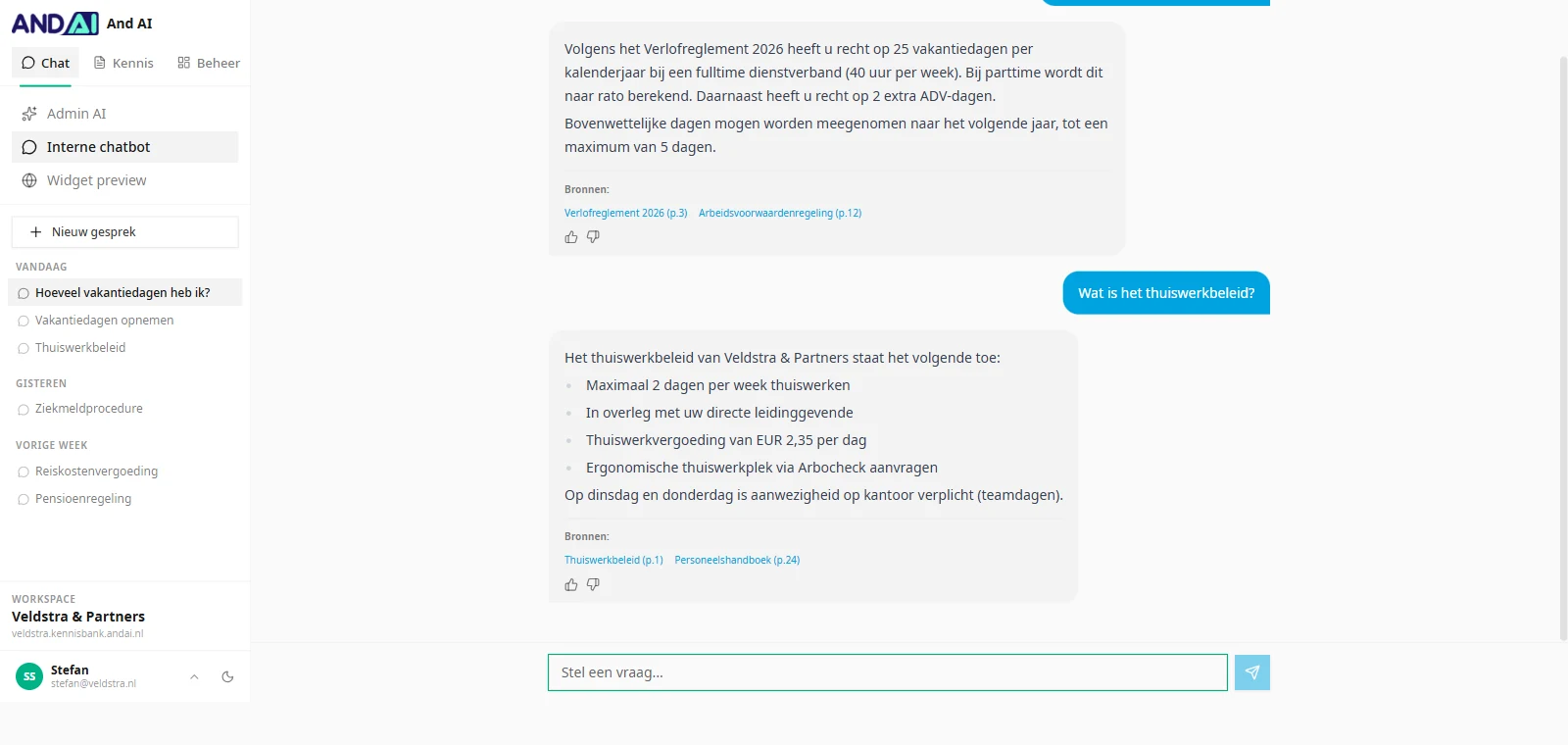
Chat thread with two questions about leave and remote working, each answer linking to the source policy and page number
Answers with a source, not a guess
"A standard assistant gives standard answers. This one knows your documents, your rules and the way you talk." The premise behind the Knowledge Assistant
Knowledge Assistant

One place where your knowledge arrives, answers questions and gets better

Sources

Your documents stay where they are

No migration and no second archive to maintain. You connect the systems you already use and the assistant keeps up with them.

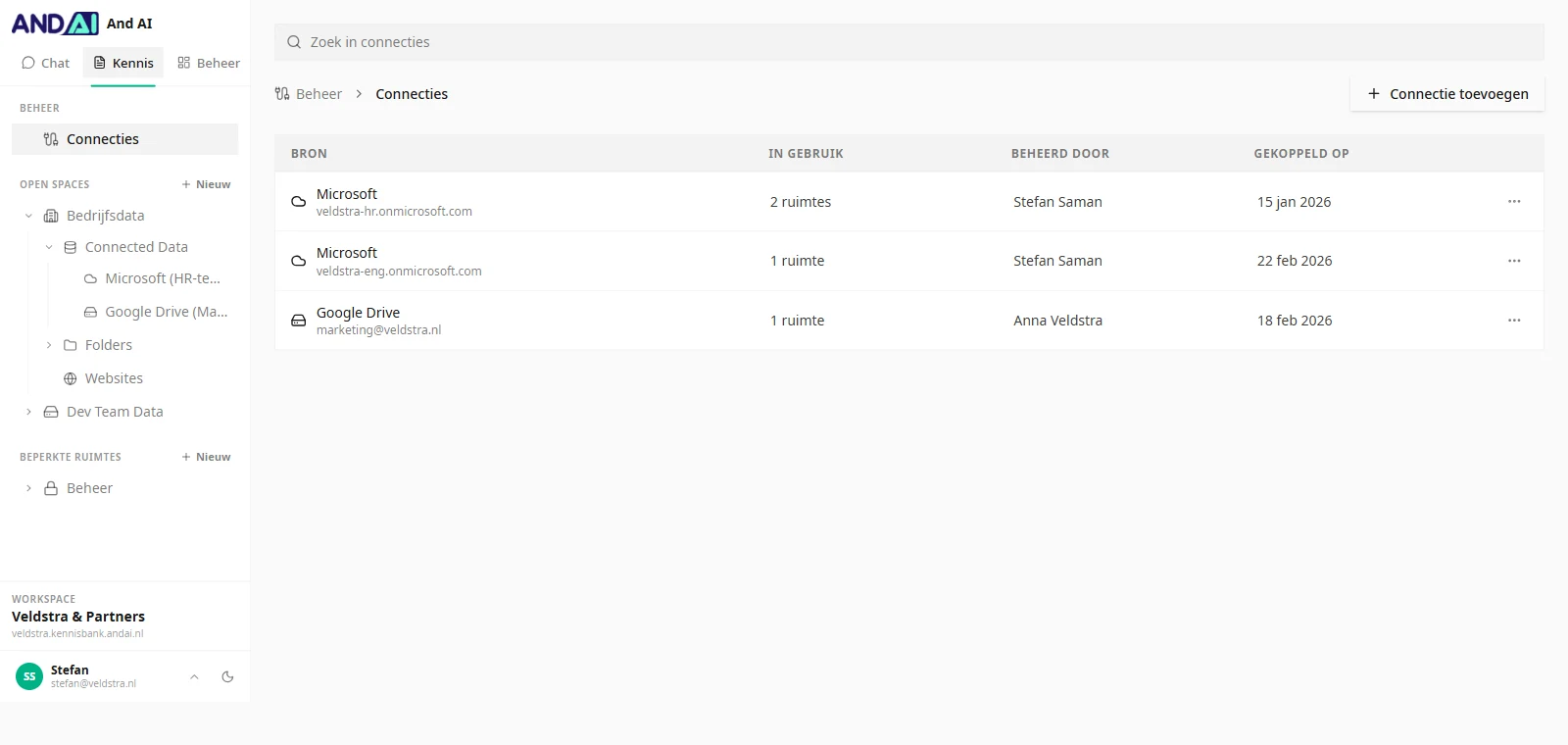
  • Microsoft: SharePoint, OneDrive, Teams and Outlook
  • Google Drive and Nextcloud
  • Individual uploads, folders and your own website
  • Per space you decide what takes part and who gets in
Overview of connected sources listing the owner and connection date for each one
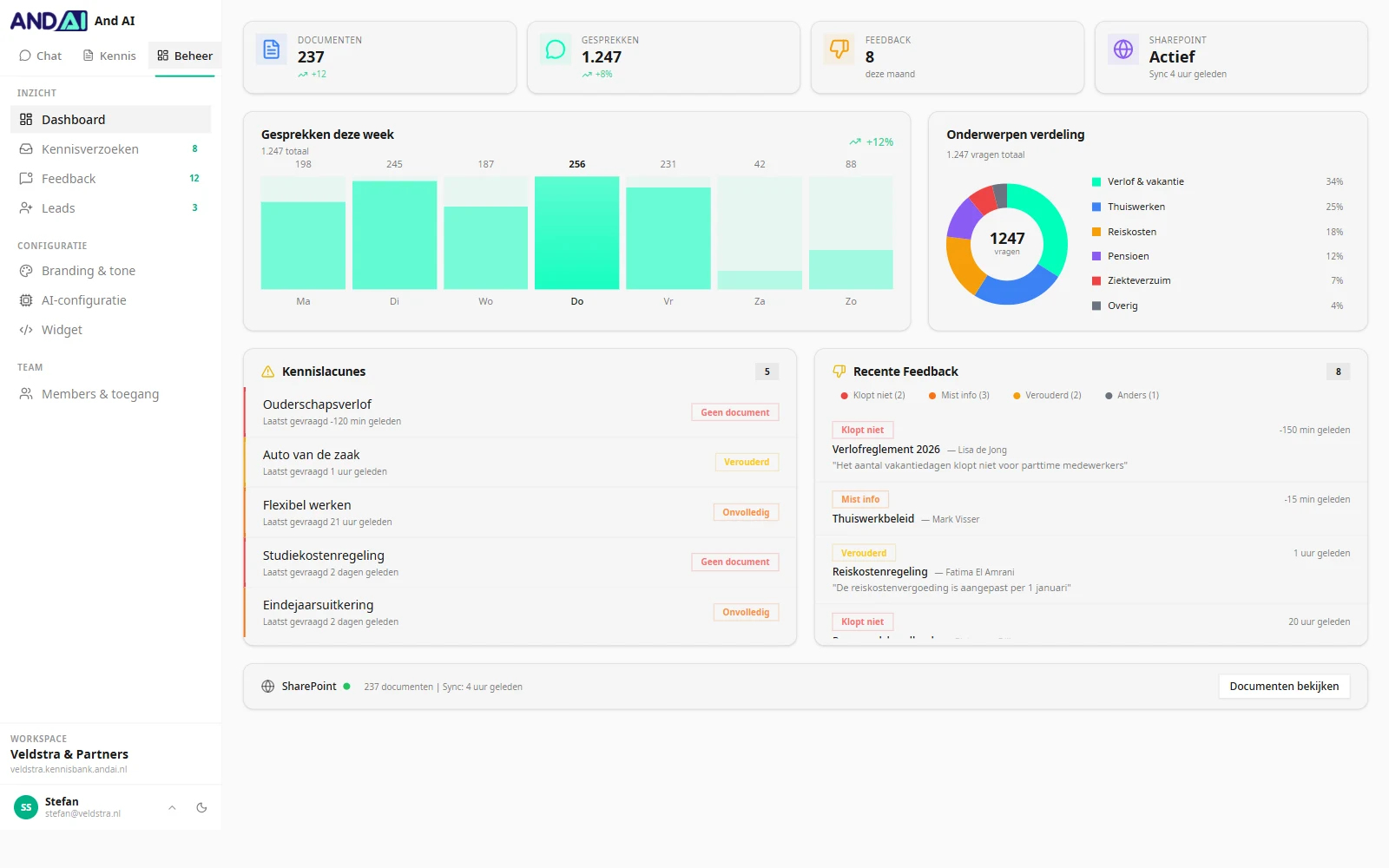
Admin dashboard showing conversations per week, a breakdown by topic and a list of knowledge gaps
Insight

You see where your knowledge falls short

Every question that goes unanswered is a hole in what you have written down. You get them in a list instead of losing them to corridor conversations.

  • Knowledge gaps: topics no document covers
  • Feedback per answer: wrong, incomplete, out of date
  • Which topics get asked about most
  • The assistant's behaviour is adjustable without a new release
Branding and tone

It sounds like your organisation

The assistant carries your name and your colours, and talks the way your people talk. You set it up and see the effect straight away.

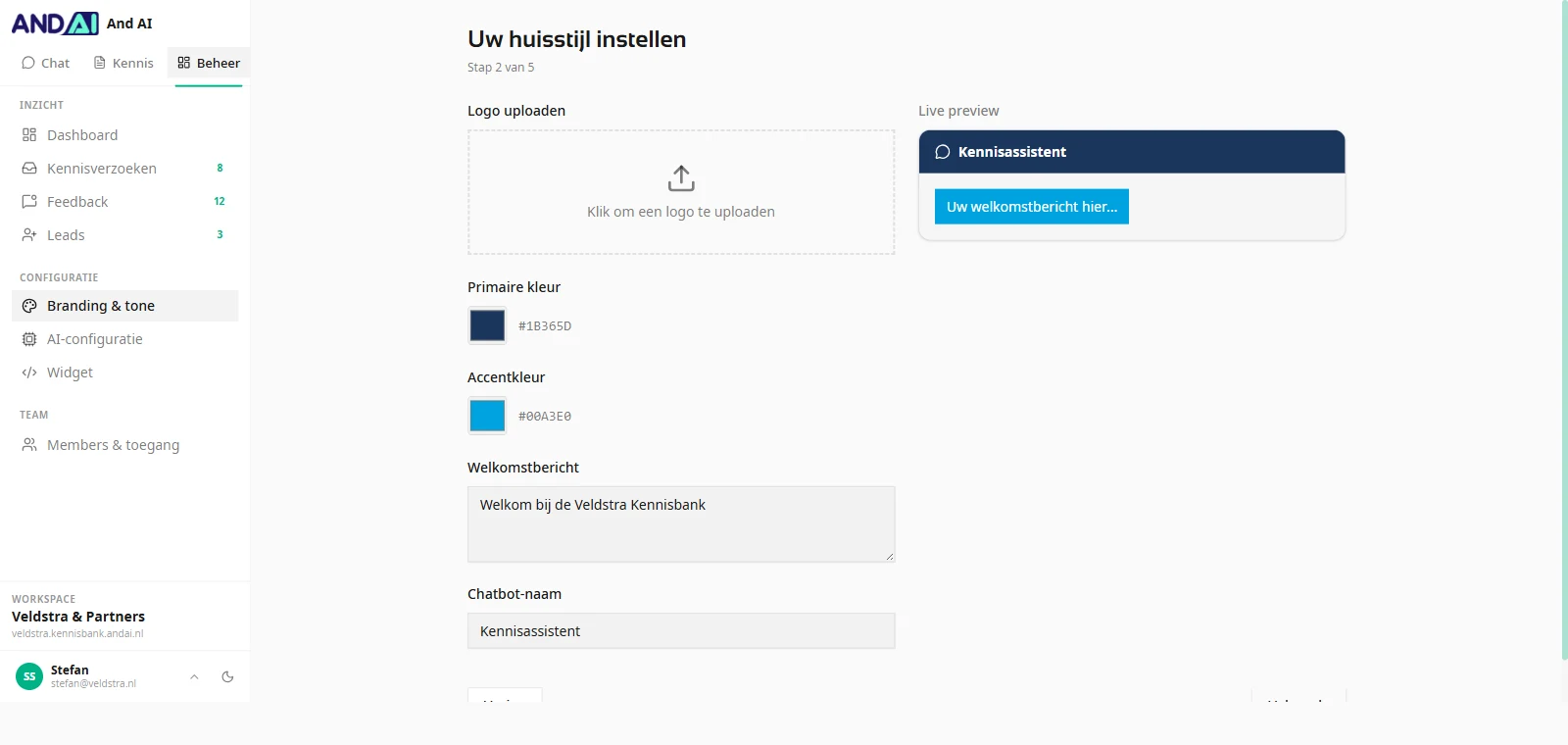
  • Your own logo, colours and name for the assistant
  • Tone you choose: formal, informal or friendly
  • Your own welcome message and suggested questions
  • Live preview: you watch the result as you set it
Branding settings screen with colour pickers, a welcome message and a live preview of the assistant
How it works

Three steps, then you run it yourself

We set it up. After that you never need to call in a developer.

1

Connect your sources

Link SharePoint, Drive or Nextcloud, or upload individual documents. The assistant indexes what you point it at.

2

Set tone and access

The assistant's name, colours and tone, plus who may consult which spaces.

3

Start asking

Internally through the chat, externally through the widget on your site. The admin view shows what gets asked and what is missing.

Two colleagues talking over a laptop in an office by the water
The result

Nobody has to be the colleague who knows everything

Knowledge that lives in three heads stops moving the moment those three people are away. Once it sits in one place and can be queried, everyone gets on without interrupting anyone first.

24/7
answers for your team and your customers, outside office hours too
Every answer
carries its source, down to document name and page
What people use it for

The same questions, week after week

Wherever people keep looking up or asking the same thing, there is something to gain. Three situations we run into most.

Customer service

Customers keep asking the same questions

The assistant sits on your site as a widget and handles the standard questions. What it cannot answer reaches you as a knowledge request or a lead.

Partner organisations

The information sits in eight places

If you work with other institutions, nobody has to tour every website. One way in, and each answer still shows which document it came from.

Internal

The knowledge lives in three people's heads

New colleagues search themselves silly and experienced ones get interrupted all day. Both problems have the same cause: nothing is written down where you can query it.

The demo

Look first, decide after

No proposal process up front. We show it and start from your situation.

NO STRINGS ATTACHED

Half-hour demo

Online, with someone who built it. Not a salesperson who has to look up the answer.

  • We walk through the assistant in a working environment
  • You tell us where your knowledge sits and who asks for it
  • We say so plainly if it is not a fit
  • After that you get a proposal for your situation, or you do not
Book a demo

Rather email first? [email protected]

Frequently asked

Worth knowing

Where do our documents live?

Exactly where they live now. The Knowledge Assistant connects to your existing sources and keeps them in sync. You decide per space which folders and files take part; anything you do not connect stays out of view. Processing runs through European data centres under the GDPR, and your documents remain yours.

What happens when the assistant does not know the answer?

It says so, rather than taking a guess. The question lands in your knowledge requests, so you can see which document is missing and add it.

How long before it goes live?

After the demo call, count on two to four weeks until the first version is live. How much documentation you have, and what state your sources are in, decides where you land in that range.

Can customers use it on our website too?

Yes. Alongside the internal environment there is a widget you drop onto your own site with a snippet of embed code. You choose which spaces the widget may draw on, so internal material stays internal.

How do we prevent wrong answers?

Every answer carries its source, down to the document name and page, so anyone can check where it came from. If something is off, the reader flags it in one click and you see that report in the admin view. That tells you which document needs attention.

Does everyone see everything?

No. Alongside open spaces there are restricted spaces, and you set access per employee. An answer can only draw on sources the person asking is allowed to see.

What does it cost?

That depends on the number of sources, the number of users and whether you also point it at your customers. In the demo we walk through your situation and you get a concrete proposal afterwards.
See it work in half an hour

An online demo with someone who built it. You will also hear when it is not right for you.

Book a demo